- Zahnärzte Dres. Zimny & Kollegen
-
Uhlandstr. 53
10719 Berlin-Wilmersdorf - [email protected]
- 030 889 20 20 0


Hat sich ein Bracket oder Band ( Metallring ) gelöst und hängt noch am Bogen, lassen Sie bitte alles so wie es ist und vereinbaren Sie einen kurzfristigen Termin zur Wiederbefestigung!
Versuchen Sie ( bspw. mit Hilfe einer Pinzette ), den Bogen wieder vorsichtig in das Bracket oder Band einzusetzen.
Bei Reibung oder Schmerzen kann die störende Stelle mit etwas Wachs abgedeckt werden. Bitte vereinbaren Sie mit uns einen Termin.
Hier hilft häufig das Wachs, das Sie von uns erhalten haben. Sollten Sie nicht über Wachs verfügen, kann vorübergehend auch zuckerfreier Kaugummi zum Abdecken benutzt werden.
Vereinbaren Sie bitte dringend einen Termin zur Beseitigung des störenden Bogenendes !
Geben Sie uns bitte beim nächsten Termin einen entsprechenden Hinweis.
Geben Sie uns bitte beim nächsten Termin einen entsprechenden Hinweis.
Vereinbaren Sie mit uns einen Termin zur Wiederbefestigung.
Wenn Ihnen die festsitzende Zahnspange gerade neu eingesetzt wurde, können vorübergehend Schmerzen auftreten. Das ist leider in einigen Fällen nicht zu umgehen. In der Regel verschwinden diese Beschwerden nach einigen Tagen wieder von alleine.
Sollten Sie jedoch nach 2-3 Tagen noch immer keine Besserung verspüren vereinbaren Sie mit uns einen Termin mit Hinweis auf Ihre Schmerzen nach dem Einsatz der Spange.
Spülen Sie Ihren Mund und besonders die wunden Stellen mit einem geeigneten Präparat, bspw. Kamillosan, o.ä.
Verspüren Sie 1-2 Stunden nach der Spülung keine Besserung, vereinbaren Sie bitte einen Termin mit uns.
Meist ist ungenügende Mund- und Zahnpflege Hauptursache für Zahnfleischentzündungen.
Pflegen Sie die Zähne einschließlich Zahnfleisch nach jedem Essen und gemäß unserer Empfehlung.
Tritt keine wesentliche Besserung ein, vereinbaren Sie einen Kontrolltermin bei uns.
Für den Fall das die Zahnspange am Zahnfleisch drücken sollte, vereinbaren Sie bitte einen Termin mit uns.
Eine beschädigte herausnehmbare Spange kann in sehr vielen Fällen problemlos repariert werden. Nur unter bestimmten Voraussetzungen ist eine Neuanfertigung erforderlich.
Bitte vereinbaren sie einen Termin.
Wichtiger Hinweis!
Passt die herausnehmbare Zahnspange noch und entstehen durch das Tragen keine Druckstellen, sollte die Spange unbedingt bis zum Termin weiter getragen werden!
Im Fall von scharfen Kanten am Kunststoff können diese vorübergehend mit Hilfe einer Nagelfeile selbst geglättet werden.
In diesem Fall ist Eile geboten, denn bei längerer Nichtnutzung der Spange besteht Rückfallgefahr und Gefährdung des erreichten Behandlungsergebnisses.
Bitte sofort einen Termin mit uns vereinbaren.
Ein schönes Lächeln mit geraden Zähnen ist nicht nur für unseren äußeren Eindruck wichtig – eine gesunde Zahnstellung vermeidet auch spätere Krankheiten der Zähne und des Kieferknochens.
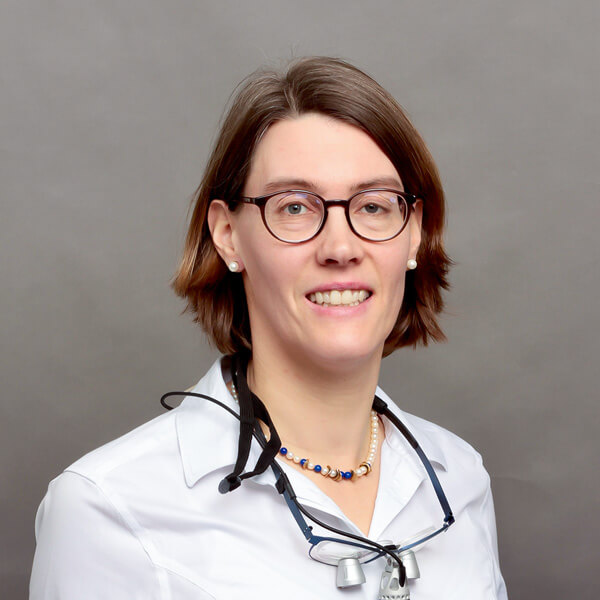
Dr. Kathrin Zimny ist vierfache Mutter, hat sich auf Kinderzahnmedizin und in einem mehrjährigen Zusatzstudium auf Kieferorthopädie spezialisiert.

Spezialistin für Kieferorthopädie und Kinderzahnärztin

Digital Smile Design (DSD) ist eine revolutionäre Methode in der ästhetischen Zahnheilkunde, die modernste Technologie mit künstlerischer Vision verbindet, um Ihr Lächeln in Perfektion zu gestalten.
Es ist wie in einer Zeitmaschine:
Bei uns sehen Sie schon heute, wie Sie mit Ihrem perfektes Lächeln morgen aussehen werden.
Ohne eine einzige Behandlung.


Zahnärzte Dres. Zimny Berlin Erklärung zur Barrierefreiheit
We firmly believe that the internet should be available and accessible to anyone, and are committed to providing a website that is accessible to the widest possible audience, regardless of circumstance and ability.
To fulfill this, we aim to adhere as strictly as possible to the World Wide Web Consortium’s (W3C) Web Content Accessibility Guidelines 2.1 (WCAG 2.1) at the AA level. These guidelines explain how to make web content accessible to people with a wide array of disabilities. Complying with those guidelines helps us ensure that the website is accessible to all people: blind people, people with motor impairments, visual impairment, cognitive disabilities, and more.
This website utilizes various technologies that are meant to make it as accessible as possible at all times. We utilize an accessibility interface that allows persons with specific disabilities to adjust the website’s UI (user interface) and design it to their personal needs.
Additionally, the website utilizes an AI-based application that runs in the background and optimizes its accessibility level constantly. This application remediates the website’s HTML, adapts Its functionality and behavior for screen-readers used by the blind users, and for keyboard functions used by individuals with motor impairments.
If you’ve found a malfunction or have ideas for improvement, we’ll be happy to hear from you. You can reach out to the website’s operators by using the following email
Our website implements the ARIA attributes (Accessible Rich Internet Applications) technique, alongside various different behavioral changes, to ensure blind users visiting with screen-readers are able to read, comprehend, and enjoy the website’s functions. As soon as a user with a screen-reader enters your site, they immediately receive a prompt to enter the Screen-Reader Profile so they can browse and operate your site effectively. Here’s how our website covers some of the most important screen-reader requirements, alongside console screenshots of code examples:
Screen-reader optimization: we run a background process that learns the website’s components from top to bottom, to ensure ongoing compliance even when updating the website. In this process, we provide screen-readers with meaningful data using the ARIA set of attributes. For example, we provide accurate form labels; descriptions for actionable icons (social media icons, search icons, cart icons, etc.); validation guidance for form inputs; element roles such as buttons, menus, modal dialogues (popups), and others. Additionally, the background process scans all the website’s images and provides an accurate and meaningful image-object-recognition-based description as an ALT (alternate text) tag for images that are not described. It will also extract texts that are embedded within the image, using an OCR (optical character recognition) technology. To turn on screen-reader adjustments at any time, users need only to press the Alt+1 keyboard combination. Screen-reader users also get automatic announcements to turn the Screen-reader mode on as soon as they enter the website.
These adjustments are compatible with all popular screen readers, including JAWS and NVDA.
Keyboard navigation optimization: The background process also adjusts the website’s HTML, and adds various behaviors using JavaScript code to make the website operable by the keyboard. This includes the ability to navigate the website using the Tab and Shift+Tab keys, operate dropdowns with the arrow keys, close them with Esc, trigger buttons and links using the Enter key, navigate between radio and checkbox elements using the arrow keys, and fill them in with the Spacebar or Enter key.Additionally, keyboard users will find quick-navigation and content-skip menus, available at any time by clicking Alt+1, or as the first elements of the site while navigating with the keyboard. The background process also handles triggered popups by moving the keyboard focus towards them as soon as they appear, and not allow the focus drift outside it.
Users can also use shortcuts such as “M” (menus), “H” (headings), “F” (forms), “B” (buttons), and “G” (graphics) to jump to specific elements.
We aim to support the widest array of browsers and assistive technologies as possible, so our users can choose the best fitting tools for them, with as few limitations as possible. Therefore, we have worked very hard to be able to support all major systems that comprise over 95% of the user market share including Google Chrome, Mozilla Firefox, Apple Safari, Opera and Microsoft Edge, JAWS and NVDA (screen readers).
Despite our very best efforts to allow anybody to adjust the website to their needs. There may still be pages or sections that are not fully accessible, are in the process of becoming accessible, or are lacking an adequate technological solution to make them accessible. Still, we are continually improving our accessibility, adding, updating and improving its options and features, and developing and adopting new technologies. All this is meant to reach the optimal level of accessibility, following technological advancements. For any assistance, please reach out to